Office Hours · Windows Installation

Training First, Install Second

Before Claude Code can be enabled for your account, please complete the 2026 Ally Claude Code Risks & Control Training in Workday (about 20 minutes). Once you've finished, we'll onboard folks in waves — two enablement windows next week.
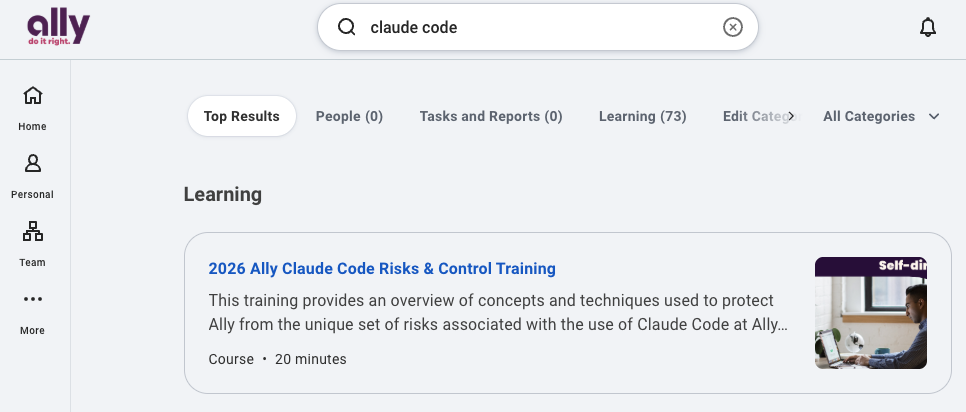
Workday search for Claude Code training
🔎 In Workday, search “claude code” and open the course
Windows · Heads Up

Plan for Up To 30 Minutes for the Installer to Complete

Ally's managed installer takes care of everything — Claude Code itself plus the prerequisites it depends on. Grab a coffee; the first install is the longest one you'll ever do.

📦

Claude Code 2.1

Published through Software Center — no manual npm or GitHub download needed.

Node.js 24 & Git

Bundled as prerequisites. If you don't already have them, the installer sets them up for you.

~30 Minutes

Walk away, grab lunch, come back. Most of the time is the prereq install running quietly.

Why so long? The installer pulls Node.js 24, Git, and their dependencies in addition to Claude Code. Let it finish — don't cancel midway.
Step 1 of 2

Open Software Center

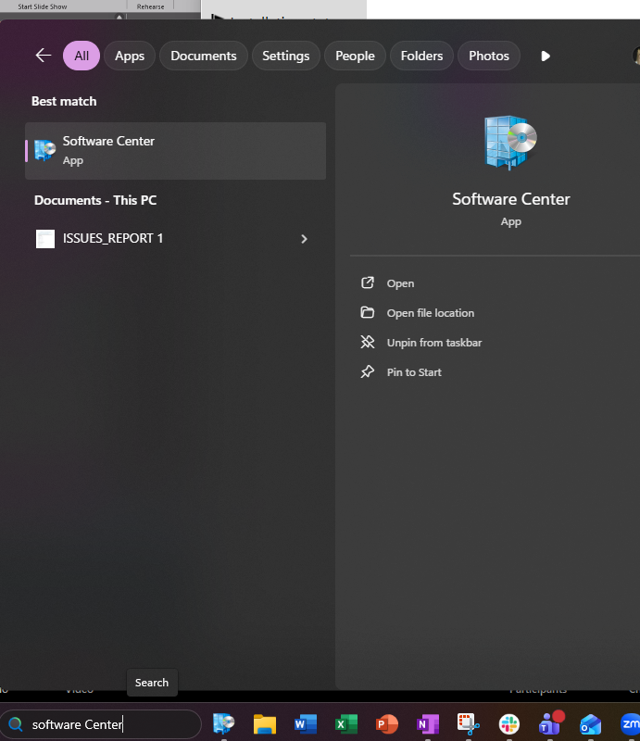
  1. Click the Windows icon Or press the Win key to open the Start menu.
  2. Type “Software Center” It should appear as the best match under Apps.
  3. Open the app You'll see the Ally-branded Software Center with an Applications list.
Windows Start menu searching for Software Center
Step 2 of 2

Install Claude Code

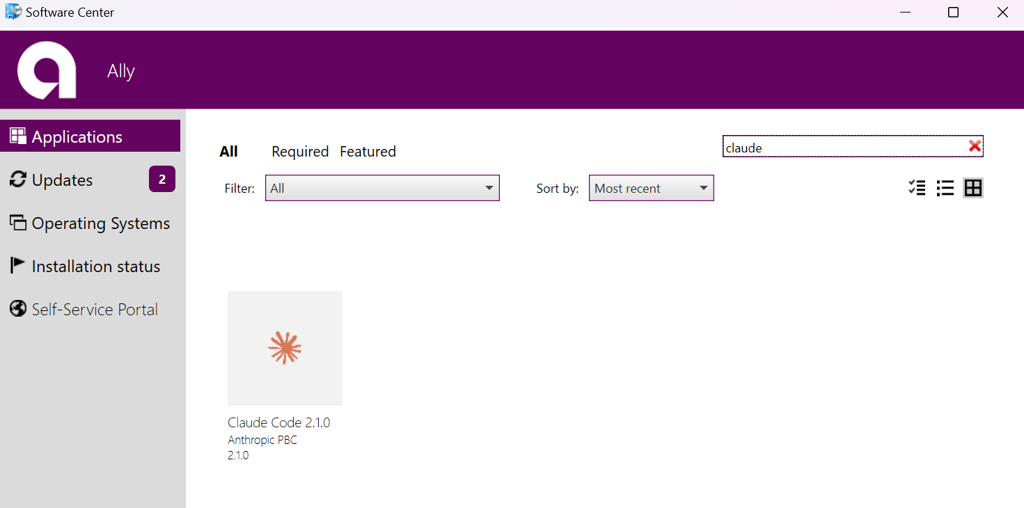
  1. Search “claude” Use the search box in the top right of Software Center.
  2. Open Claude Code 2.1.0 Published by Anthropic PBC. Click the tile to open it.
  3. Click Install Then walk away — the installer handles Node.js, Git, and Claude Code end-to-end.
🚧
Don't see the installer? The Windows installer is gated on Claude Code access — if you haven't been enabled yet, the Claude Code tile simply won't appear in Software Center. Finish your training in Workday and wait for your enablement wave; once you're in, the tile shows up automatically.
Software Center showing Claude Code 2.1.0 tile
When Things Go Sideways

Basic Troubleshooting

You've completed training and your enablement wave has started, but Claude Code still won't launch or connect. Work through these in order — most issues clear up by step 1.

1

Restart your computer

Always the first step. A fresh reboot clears stuck processes and finalizes pending installs.

2

Back up your settings

In PowerShell, move your settings file aside so Claude Code starts from a clean config:

cd ~\.claude
ren settings.json settings.json.bak
3

Reinstall from Software Center

Open Software Center, find Claude Code 2.1.0, and click Reinstall. Launch Claude Code again once it finishes.

🧠
Claude's working — just not how you want? Ask Claude for help. Say something like “help me configure yourself to …” or “troubleshoot why you keep …” and it will walk you through settings, permissions, and fixes.
💬
Still stuck? Come to Claude Code Office Hours or drop into the Claude Code Teams channels.
How They Compare

Claude Code & Ally Code Assist

Good news — you don't have to choose. Code Assist and Claude Code shine in different moments. Use Code Assist for lightning-fast autocomplete while you type; bring in Claude Code when you want to hand off an entire task end-to-end.

Dimension Ally Code Assist Claude Code
Autocomplete Tab-complete as you type Task-oriented — not keystroke-oriented
Context You @-mention files manually Autonomously reads, greps, and discovers what it needs
Autonomy You ask, apply manually Multi-step: write → test → fix → commit
Shell & Tools Limited terminal Full shell + MCP (GitLab, Jira, Dynatrace, …)
Sub-agents None Spawns parallel agents for research & validation
🤝
They're complementary — use both. Keep Code Assist open for fast autocomplete in your IDE. Reach for Claude Code when you want to say “add this feature, run the tests, and open an MR” and walk away.
Seeing This Error?

Not Enabled Yet — That's OK!

If Claude Code launches but shows an API Error: 403 — User is missing the required AD group(s) (UNAUTHORIZED_GROUP_ACCESS_ERROR), your account simply hasn't been added to an enablement wave yet. Nothing is broken — you're just a little early.

Claude Code 403 UNAUTHORIZED_GROUP_ACCESS_ERROR — user missing required AD groups
1

Finish your Workday training

Complete the Claude Code training in Workday if you haven't already — that's the gate for being added to an enablement wave.

2

Wait for the next wave

Enablement waves run twice a week, the week after your Claude Code enablement. Once you're in the wave, access turns on automatically — no ticket needed.

🎉
You're on the list — hang tight. Seeing this error means Claude Code is installed and talking to Ally's gateway correctly. The last step is the AD group sync, which happens on the wave cadence. Re-launch Claude Code after your wave completes and you're off to the races.
Speed
Slide 1 / 7 Manual mode — click Start Slideshow to auto-advance